> ## Documentation Index
> Fetch the complete documentation index at: https://fossabot.com/docs/llms.txt
> Use this file to discover all available pages before exploring further.
# Getting Started
Getting started is easy with Fossabot, simply head to [fossabot.com](https://fossabot.com) and click "Log In". You will be taken to an authorization screen from Twitch:
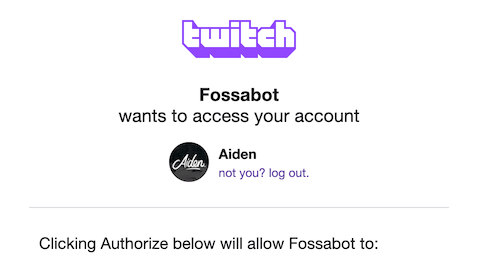 Simply click "Authorize" at the bottom of the page to connect Fossabot with your Twitch account:
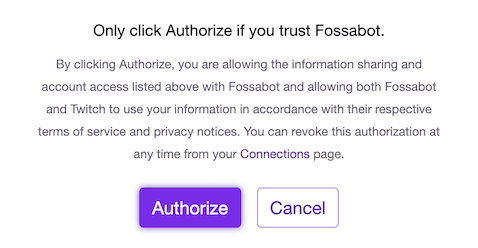 Once you have done that, you'll be redirected back to Fossabot and it will automatically set you up with your own personal dashboard!
## First-time setup
When you sign up for the first time, Fossabot opens a guided setup wizard on top of your dashboard. The wizard walks you through getting Fossabot into your chat, one step at a time:
* **Join your channel**: Have Fossabot join your chat. You can also make Fossabot a moderator in the same click.
* **Make Fossabot a mod**: Fossabot needs moderator status to clear spam, time out chatters, and run your filters. Fossabot skips this step if it's already a moderator.
* **Link more channels**: If you stream on more than one platform, link those channels so you can manage every chat from one dashboard.
* **Import settings**: If you're coming from another bot, import your commands, timers, and spam filters.
* **Learn the basics**: Short introductions to [commands](/docs/commands/custom-commands), blocked terms, spam filters, and [keywords](/docs/keywords).
* **All set**: Links to the Fossabot community for help, ideas, and updates.
You complete actions like joining, making Fossabot a moderator, and importing directly inside the wizard. Each of these steps has a **Skip** button if you'd rather do it later, and you can use **Back** to revisit a previous step. You can also close the wizard at any time.
When you finish the last step, the wizard closes and your dashboard opens.
## Related topics
- [Welcome to Fossabot](/docs/index.md)
- [Moderation](/docs/mediarequest/moderation.md)
- [$(customapi)](/docs/variables/customapi.md)
This documentation is built and hosted on [Mintlify](https://mintlify.com), a developer documentation platform.
Once you have done that, you'll be redirected back to Fossabot and it will automatically set you up with your own personal dashboard!
## First-time setup
When you sign up for the first time, Fossabot opens a guided setup wizard on top of your dashboard. The wizard walks you through getting Fossabot into your chat, one step at a time:
* **Join your channel**: Have Fossabot join your chat. You can also make Fossabot a moderator in the same click.
* **Make Fossabot a mod**: Fossabot needs moderator status to clear spam, time out chatters, and run your filters. Fossabot skips this step if it's already a moderator.
* **Link more channels**: If you stream on more than one platform, link those channels so you can manage every chat from one dashboard.
* **Import settings**: If you're coming from another bot, import your commands, timers, and spam filters.
* **Learn the basics**: Short introductions to [commands](/docs/commands/custom-commands), blocked terms, spam filters, and [keywords](/docs/keywords).
* **All set**: Links to the Fossabot community for help, ideas, and updates.
You complete actions like joining, making Fossabot a moderator, and importing directly inside the wizard. Each of these steps has a **Skip** button if you'd rather do it later, and you can use **Back** to revisit a previous step. You can also close the wizard at any time.
When you finish the last step, the wizard closes and your dashboard opens.
## Related topics
- [Welcome to Fossabot](/docs/index.md)
- [Moderation](/docs/mediarequest/moderation.md)
- [$(customapi)](/docs/variables/customapi.md)
This documentation is built and hosted on [Mintlify](https://mintlify.com), a developer documentation platform.