> ## Documentation Index
> Fetch the complete documentation index at: https://fossabot.com/docs/llms.txt
> Use this file to discover all available pages before exploring further.
# Phrase Groups
Phrase groups allow you to define a set of phrases that must be matched in order to trigger a keyword. Every single phrase within a given phrase group **must** match, else Fossabot will continue to match other groups.
You can have multiple phrase groups per keyword, which act as "OR" statements for triggering a keyword. Phrase groups are by default fuzzy-matched and case-insensitive, but there are optional flags that allow you to customize the matching behaviour of a given phrase:
## Adding a phrase to a group
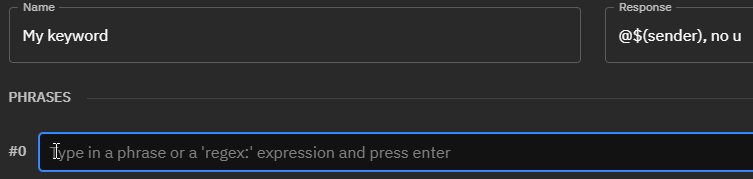
To add a phrase to a phrase group, simply click inside a phrase group:
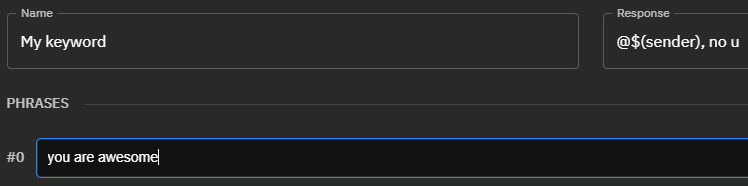
 Then type the phrase into the input:
 Finally, hit the **return key on your keyboard** to add it to the phrase:
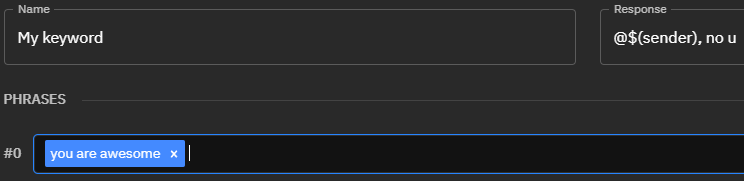 You should see the phrase in a blue tag, this means it has been added to the keyword phrase group.
## Using phrase groups
Consider the following phrase group:
You should see the phrase in a blue tag, this means it has been added to the keyword phrase group.
## Using phrase groups
Consider the following phrase group:
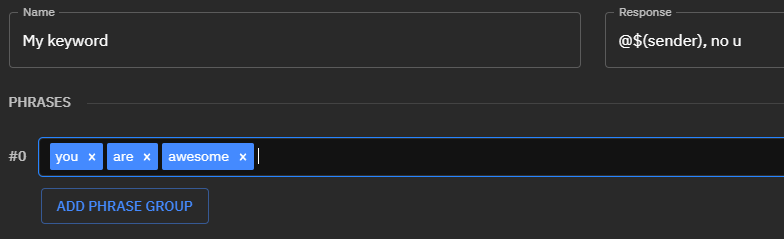 This phrase group will trigger if `you`, `are` and `awesome` appear **anywhere** in the message content. So `you are awesome` could match, but so could `awesome are you` or even `you are not awesome`. This also ignores spaces, so `you're aren't awesomest` would also be matched by Fossabot.
However, you could combine these phrases into a single phrase:
This phrase group will trigger if `you`, `are` and `awesome` appear **anywhere** in the message content. So `you are awesome` could match, but so could `awesome are you` or even `you are not awesome`. This also ignores spaces, so `you're aren't awesomest` would also be matched by Fossabot.
However, you could combine these phrases into a single phrase:
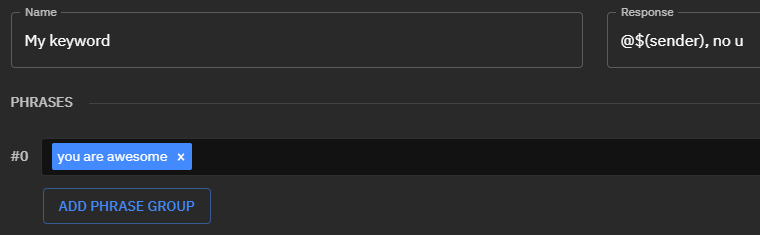 Then Fossabot would match `you are awesome!!`, but **not** `you are not awesome` - as the entire phrase block is not able to be matched **anywhere** in `you are not awesome`.
## Multiple phrase groups
Assuming a use case where you would like to match `you are awesome` or `you are cool`, it may be your first instinct to do something like this:
Then Fossabot would match `you are awesome!!`, but **not** `you are not awesome` - as the entire phrase block is not able to be matched **anywhere** in `you are not awesome`.
## Multiple phrase groups
Assuming a use case where you would like to match `you are awesome` or `you are cool`, it may be your first instinct to do something like this:
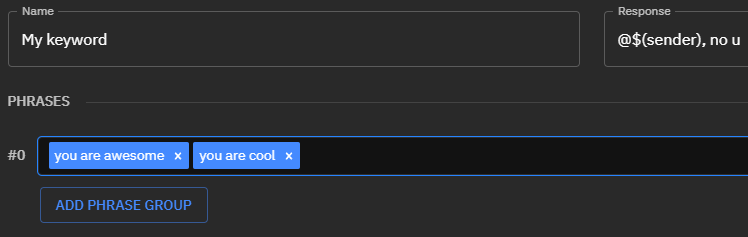 However, **this is incorrect!** You are asking Fossabot to only match content that contains **both** `you are cool` **AND** `you are awesome`. You will want to create multiple phrase groups to create an `OR` condition, where instead you ask Fossabot to match if **either** phrase exists.
Click the `Add Phrase Group` button, it will add another input, and move `you are cool` into the below phrase group like so:
However, **this is incorrect!** You are asking Fossabot to only match content that contains **both** `you are cool` **AND** `you are awesome`. You will want to create multiple phrase groups to create an `OR` condition, where instead you ask Fossabot to match if **either** phrase exists.
Click the `Add Phrase Group` button, it will add another input, and move `you are cool` into the below phrase group like so:
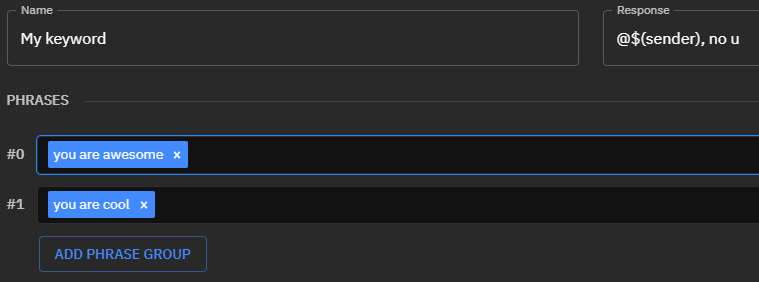 This will then match if **either** `you are cool` OR `you are awesome` is contained within the message content!
## Related topics
- [Creating a Lookalike](/docs/lookalikes/creating-lookalikes.md)
- [Variables](/docs/keywords/variables.md)
- [$(autoreason)](/docs/keywords/autoreason.md)
- [Keywords](/docs/keywords/index.md)
- [Flags](/docs/keywords/flags.md)
This documentation is built and hosted on [Mintlify](https://mintlify.com), a developer documentation platform.
This will then match if **either** `you are cool` OR `you are awesome` is contained within the message content!
## Related topics
- [Creating a Lookalike](/docs/lookalikes/creating-lookalikes.md)
- [Variables](/docs/keywords/variables.md)
- [$(autoreason)](/docs/keywords/autoreason.md)
- [Keywords](/docs/keywords/index.md)
- [Flags](/docs/keywords/flags.md)
This documentation is built and hosted on [Mintlify](https://mintlify.com), a developer documentation platform.