> ## Documentation Index
> Fetch the complete documentation index at: https://fossabot.com/docs/llms.txt
> Use this file to discover all available pages before exploring further.
# Variables
All supported variables are listed here in the Fossabot documentation!
Variables offer inline, dynamic text replacement for Fossabot responses.
## Usage
Use the `$()` syntax within your chat responses to insert dynamic data.
For example, [**\$(sender)**](/docs/variables/sender) allows you to mention the name of the user triggering the action, you may choose to invoke this variable within a command such as `Hello, $(sender)!`. See the below example for more details.
## Example
A command with the following configuration:
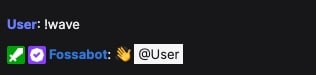
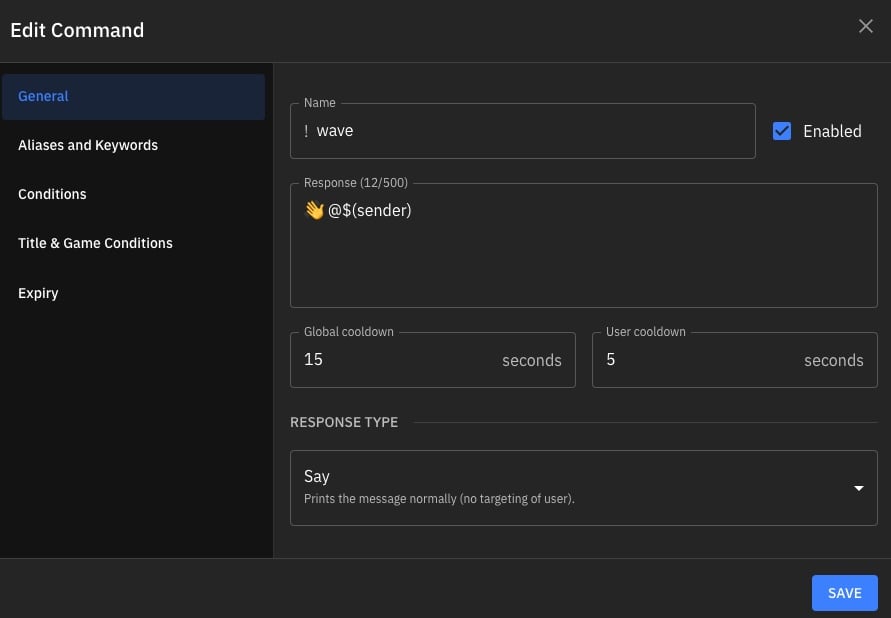 ...would produce the following output in [**Twitch**](https://twitch.tv) chat.
 ## Related topics
- [Variables](/docs/keywords/variables.md)
This documentation is built and hosted on [Mintlify](https://mintlify.com), a developer documentation platform.
## Related topics
- [Variables](/docs/keywords/variables.md)
This documentation is built and hosted on [Mintlify](https://mintlify.com), a developer documentation platform.